INTERCONNECTED PLATFORM
OMNIBOT 360°
The interconnected, omnipresent platform of the OMNIBOT ecosystem.
Two coordinated spaces under one sign-in: OMNIBOT Surgeon 360°, the professional platform for surgeons and mentors, and the Hospital Command Center, the institution’s own platform. They meet only through permissioned evidence exchange.
Illustrative diagram
Professional platform
OMNIBOT Surgeon 360°
- Surgeon record
- Mentor workspace
Institutional platform
Hospital Command Center
- Operations & governance
- Implementation & growth
PLATFORM TOUR
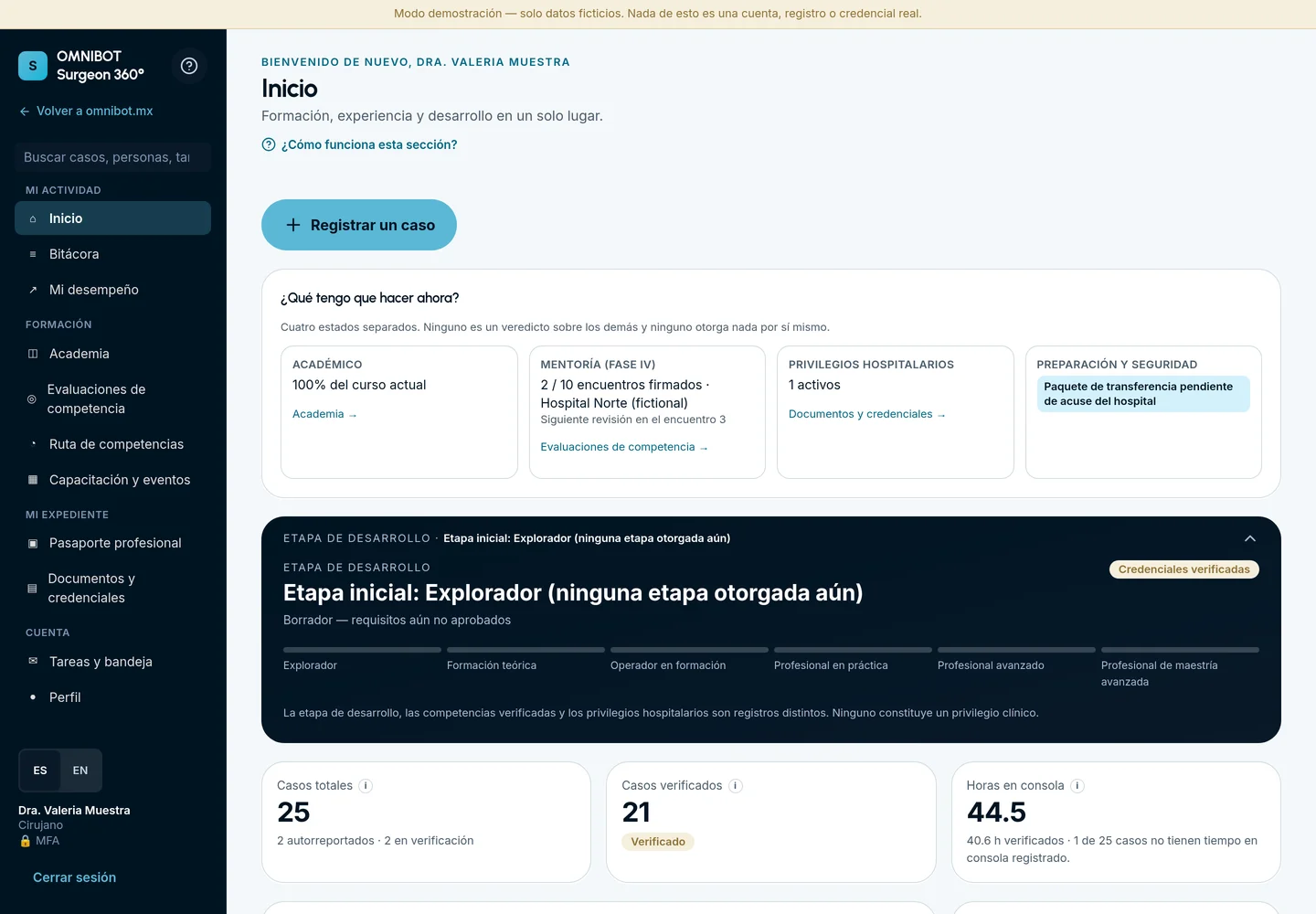
This is OMNIBOT 360°
Choose a role to see the real portal interface. Screens show the portal in Spanish.
PROFESSIONAL RECORD
Your training and record, in one place.
Logbook, assessments, competency path and professional passport. Kajabi synchronization is pending configuration.
Principal surgeons, assisting surgeons and nursing staff: each professional keeps their own identity and role. Hospitals take part through institutional programs for their teams.
- 1Academic and mentoring status
- 2Privileges and readiness, visible in one place
- 3Principal-surgeon example; assistant and nursing views planned
COMING SOON · Surgical team record
The principal surgeon will record the case and link the participating assisting surgeons and nursing staff. Each participation will appear in the corresponding profile, with its role and origin, without duplicating the case.
- 1The principal surgeon registers the case
- 2Links assisting surgeons and nursing
- 3Participation appears in each profile, with role and origin
Planned feature; not yet implemented in the portal. No real patient data.
PROFESSIONALS & HOSPITALS
Two spaces, each with its own authority
The professional journey belongs to the surgeon. Program decisions belong to the hospital. OMNIBOT 360° keeps them apart — and lets the right evidence move between them when it is shared.
Professional platform
OMNIBOT Surgeon 360°
For surgeons and mentors: a lifelong professional record, structured mentorship and a portfolio the surgeon controls.
Institutional platform
Hospital Command Center
For hospital leadership: one command center to run, govern, implement and grow the robotic program.
Integrated professional record
Learning, logged participation, assessments and credentials sit in one place, each entry with its source and verification state.
Longitudinal mentorship
Observed encounters, debriefs and milestone reviews build over time instead of living in separate forms.
Institutional governance
Hospitals review evidence and make their own privileging and authorization decisions, with a traceable history.
Bilingual and traceable
English and Spanish interfaces; amendments, imports and signatures keep their provenance.
Surgeons: your professional record, in your hands
Everything that documents your robotic development, organized and verifiable.
Four separate statuses
Academic, mentorship, hospital privileges and readiness — shown side by side, so one never masks another.
Logbook with provenance
Your own role and console time, with verification by an assigned institutional verifier, amendments and import history.
Assessments & Phase IV
Mentor assessments and milestone reviews, read in full and attached to each encounter.
Professional Passport
Choose which evidence to share with a reviewing institution — controlled sharing, not open access.
MENTORS
Mentors: a focused faculty workspace
Structured tools to observe, assess and sign — the mentor teaches and evaluates; the hospital decides.
Assigned encounters
A daily queue of encounters, milestone reviews and tasks assigned to you.
Observation & debrief
Each element marked observed, not observed, not applicable or incomplete, followed by a debrief.
Signed assessment
A signed PDF record of the completed encounter.
Milestones & remediation
Phase IV milestones over time and documented remediation plans when more practice is needed.
Mentors do not hold hospital authority: privileges and case authorization stay with the institution.
HOSPITALS
Hospital Command Center: the institution’s platform
A distinct institutional platform — not a step in the surgeon’s journey. It gives hospital leadership one place to run, govern, implement and grow the robotic program.
- 01
Operations
- Overview & decision queue
- Authorized roster
- Institutional cases
- Utilization from recorded cases
- Verifier assignments
Know who is active, what is pending and how the system is used.
- 02
Governance
- Privileges & case authorization
- Governance Council
- Encounters
- Safety & readiness
Decisions with the evidence beside them and a written history.
- 03
Implementation
- Robotic program
- Turnkey tasks, dependencies & launch gates
- Phase IV programs
- Incoming transfer packets & acknowledgment
Clear checkpoints from launch to new surgeons joining.
- 04
Growth
- Program analytics with declared assumptions
- Financial assumptions (controlled access)
- Buyer’s Kit
Numbers you can question, shared only with the right people.
CONNECTING THE SPACES
Connected only by permissioned evidence
Each role sees only the evidence its role, institution and assignment permit; no role can act with another role’s authority.
- 01The surgeon selects evidence in the Professional Passport or a transfer packet.
- 02The hospital receives it in the Command Center and records an acknowledgment.
- 03The hospital council decides privileges and case authorization, with the evidence beside the decision.
What the portal does not do
- Credentials are not privileges. Only your institution grants privileges.
- Case counts do not establish competence automatically.
- Choosing a role on the sign-in screen never grants access; access comes from authorized workspaces.
- The portal does not receive live data from the robot.
AVAILABILITY
Current status
- Available
Live access
Sign-in is live at portal.omnibot.mx for accounts provisioned by participating institutions.
- Coming soon
Course record integration
Coming soon. Pending: Academy coursework is shown as a current qualification, not live-synchronized.
- Not included
No live robot feed
The portal does not receive live data from the robot; utilization comes from recorded cases.
Frequently asked questions
When can I sign in?
Access is available at portal.omnibot.mx/login for accounts provisioned by a participating institution or program. Without an account, request an invitation from your institution.
How do I get an account?
Accounts are provisioned through participating institutions and programs. Send an institutional inquiry to start.
Is there one sign-in for every role?
Yes. One shared sign-in opens only the workspaces you are authorized for, such as surgeon, faculty or hospital.
Does the portal decide who can operate?
No. It organizes evidence. Privileges and case authorization remain decisions of each hospital.
Is it available in Spanish?
Yes, the portal is designed for English and Spanish.
Can I enter patient information?
Follow your institution’s data policies. Never send identifiable patient information through this website’s inquiry form.
PLATFORM ACCESS
Questions or access requests
Contact OMNIBOT MX directly. Do not send identifiable patient information.
An omnipresent ecosystem. An interconnected environment.
Access is available. Sign in or request an invitation from your institution.